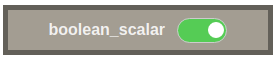
Boolean Display
The widget enables the user to set boolean values by using a switch button.
Widget setting
The following image shows an example of a widget setting.

It is possible to customize the widget settings from the inspector panel (in edit mode), as shown below:
Input value |
Description |
|---|---|
Device |
Type in a device name (or * to list all devices) |
Attribute |
Once a device is selected, type in an attribute name (or * to list all available attributes) |
Attribute Display |
Select the Label, Name, or None for the attribute |
Device Name |
Displays the device name when enabled |
Show Tango Database Name |
Displays the tango database name when enabled |
Align Switch Right |
Aligns the switch to the right when enabled |
Custom CSS |
Write custom CSS for the widget container. The syntax is the same as standard CSS used in HTML files |
On State CSS |
Write custom CSS for the on state. The syntax is the same as standard CSS used in HTML files |
Off State CSS |
Write custom CSS for the off state. The syntax is the same as standard CSS used in HTML files |
Applying CSS to widget

The CSS rules written in the Custom CSS section are applied to the widget as shown below: