Taranta Architecture
Taranta is composed of four projects:
Taranta Frontend https://gitlab.com/tango-controls/web/taranta
Taranta Dashboards https://gitlab.com/tango-controls/web/taranta-dashboard
Taranta Auth https://gitlab.com/tango-controls/web/taranta-auth
The following diagram shows an overview of the architecture:
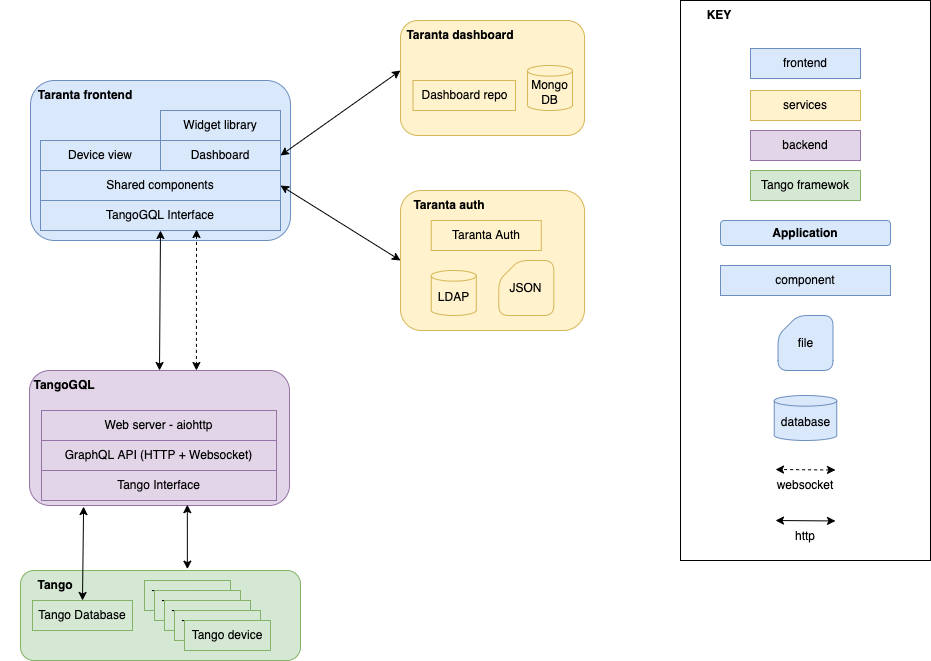
Taranta Frontend is a React client that is used both to browse, inspect and control Tango devices and to create and run dashboards, each composed of widgets. Taranta Frontend accesses the Tango Control Framework through TangoGql, a GraphQL interface to Tango. The communication between Taranta and TangoGQL is managed by an appropriate frontend component.
To use Taranta, an anonymous user can run dashboards and can browse and inspect devices. However, to be able to send commands to devices, to change their attributes and to create or modify dashboards, you need to authenticate with Taranta.
Taranta uses taranta-auth to manage user authentication. It retrieves user information either from an LDAP repository or a JSON file. Additionally, it supports OIDC authentication. To enable OIDC, set the custom variable OIDC_AUTHENTICATE in the config.js file, and configure the corresponding OIDC parameters as environment variables in taranta-auth.
OIDC_AUTHENTICATE: 0: Taranta uses file based passport mechanism to authenticate the user.OIDC_AUTHENTICATE: 1: Taranta uses KEYCLOAK as Identity Provider to authenticate the user.OIDC_AUTHENTICATE: 2: Taranta uses MS ENTRA ID as Identity Provider to authenticate the user.
The dashboards created by an authenticated user are stored in a MongoDB database through the dashboard-repo application.