Logo
2.18.3
  • Home
    • Introduction
      • Current version
        • History of changes to Taranta (former Webjive)
        • What is Taranta
        • How to install Taranta
        • How to contribute to Taranta
        • Taranta Architecture
        • How to use Taranta
        • Sharing dashboard
        • Working with SVG
        • Available widgets
        • Deprecated widgets
        • Configuration
        • Dashboard environment
        • Error Handling Documentation
    • For developers
    • Authors
  • History of changes to Taranta (former Webjive)

User guide

  • What is Taranta
  • How to install Taranta
  • How to contribute to Taranta
  • Taranta Architecture
  • How to use Taranta
  • Sharing dashboard
  • Working with SVG
  • Available widgets
    • Dealing with labels
    • Dealing with attributes
    • Dealing with commands
    • Dealing with spectrum
    • Dealing with grouping of widgets
    • Dealing with dashboard
      • Dashboard Link
        • Widget setting
        • Applying CSS to widget
        • A note on Shared dashboards
      • Embed Page
      • Filter
      • Variable Selector
    • Dealing with logs
    • Dealing with SVG
    • Dealing with images
    • Dealing with Sardana
    • Dealing with alarms
  • Deprecated widgets
  • Configuration
  • Dashboard environment
  • Error Handling Documentation

Architectural view

  • Taranta Architecture
  • Basic description of Taranta architecture
  • A Component and Connector View of Taranta Suite
  • A Module View Of Taranta Suite
  • Taranta charts

How to extend Taranta

  • How to Deploy a Widget

Known issues

  • Current known issues

External resources:

  • TangoGQL
  • Taranta authorization
  • Taranta Dashboard

State structure

  • Redux Store Structure
Taranta
  • Available widgets
  • Dashboard Link
  • View page source

Dashboard Link

This widget provides a convenient way to link to other dashboards. It can be configured to open the dashboard in either the same tab or a new tab. The widget also supports custom styling to fit seamlessly into any dashboard design.

The widget uses the dashboard name to create a direct link. If the dashboard is renamed, the widget will try to link to it by its ID.

Widget setting

The following image shows an example of a widget setting.
IMG1

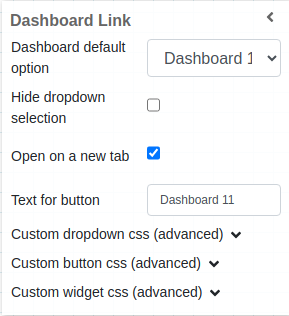
It is possible to customize the widget settings from the inspector panel (in edit mode), as shown below:

Input value

Description

Dashboard Default Option

Select the default dashboard to link to

Hide Dropdown Selection

Boolean to decide if dropdown is visible or not

Open on a New Tab

Boolean to decide if the link opens in a new tab

Text for Button

Text to display on the button

Custom Dropdown CSS

Write custom CSS for the dropdown. The syntax is the same as standard CSS used in HTML files

Custom Button CSS

Write custom CSS for the button. The syntax is the same as standard CSS used in HTML files

Custom Widget CSS

Write custom CSS for the widget container. The syntax is the same as standard CSS used in HTML files

Once the widget is added, you can select the default dashboard the link should point to.

IMG2

The widget also provides advanced styling options to customize the appearance of the dropdown and button.

IMG3

Applying CSS to widget

The look and feel of widgets can be customised using the Custom CSS section. The CSS syntax is the same used in HTML files.

IMG4

A note on Shared dashboards

While the widget will show up on the dashboard for all users, there are a few things to consider:

  • The dropdown will only show dashboards that are owned by the logged in user, it is therefore recommended to hide the dropdown for shared dashboards.

  • If the dashboard set as default also happens to be shared with a user, they can use the link to access it directly.

  • If the dashboard is not shared with the user, the user will see a message indicating that they do not have access to the dashboard.

Previous Next

© Copyright 2021-2026, Taranta.

Built with Sphinx using a theme provided by Read the Docs. Creative Commons Licence
Taranta Documentation by Max-IV Institute - SKA is licensed under a Creative Commons Attribution 4.0 International License .
Based on a work at gitlab.com/tango-controls/web/taranta .