Sardana Motor
The widget allows the user to control Sardana motor from Taranta. It provides a graphical interface to move a motor to a specified position with monitoring its state transition.
Widget setting
The following image shows an example of a widget setting.
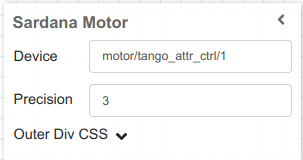
It is possible to customize the widget settings from the inspector panel (in edit mode), as shown below:
Input Value |
Description |
|---|---|
Device |
Type in a device name (or * to list all) |
Precision |
Specify the precision when showing the current position |
Outer Div CSS |
Write custom CSS for the outer div. The syntax is the same as standard CSS used in HTML files |
In run mode
The motor state and its current position are shown in run mode. You can specify a target position value in the input box and choose either absolute or relative movement by selecting the triangle box. Click the Move button to move the motor. When it starts moving, the motor state will switch to Running. The time it takes to reach the target position depends on the motor velocity and the distance. After reaching the target position, the state returns to On.
