Image table
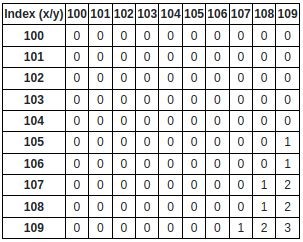
The widget displays a tango image as a table
Widget setting
The following image shows an example of a widget setting.

It is possible to customize the widget settings from the inspector panel (in edit mode), as shown below:
Input value |
Description |
|---|---|
Device |
Type in a device name and an attribute name (or * to list all) |
Limit Rows to Display (0 - no limit) |
Set the limit on rows |
Limit Columns to Display (0 - no limit) |
Set the limit on column |
Offset on Rows |
Set the offset on rows |
Offset on Columns |
Sets the offset on columns |
Show Device |
Displays the device name when enabled |
Show Tango Database Name |
Displays the tango database name when enabled |
Show Attribute |
Displays the attribute name when enabled |
Show Index |
Displays the index when enabled |
Show Labels |
Displays the labels of the index when enabled |
Show Warning |
Displays a warning in case the image size changes when enabled |
Font Size (px) |
Sets the font size |
Widget in runMode