Label
The widget displays (mostly) static content. This widget is perhaps the most basic widgets in Taranta, but at the same time it’s very flexible and rich in features. In its simplest form, it just displays static text, but because of it’s hyperlink feature it can also be a navigational tool between different dashboards or external resources. When Auto Resize is set to ‘Enabled’, the label will allow the user to resize the label by dragging the bottom right corner of the widget. This is useful when the label contains a lot of text. Additionaly, it enables the creation of well structured and visually appealing dashboards.
Widget setting
The following image shows an example of a widget setting.

It is possible to customize the widget settings from the inspector panel (in edit mode), as shown below:
Input value |
Description |
|---|---|
Text |
Sets the text content |
Text Color |
Specify the text color for the given widget |
Background Color |
Specify the background color for the given widget |
Border Width (in units) |
Sets the border width |
Borde Color |
Specify the border color for the given widget |
Font Type |
Choose a font family. Either the default or Monospaced |
Auto Resize |
When Auto Resize is set to ‘Enabled’, the font size option will be disabled, as it will be user defined |
Text Size (in units) |
1 corresponds to 1em text size |
Link To |
Render the label text as a hyperlink, which when clicked opens up the target in a new brower tab |
Custom CSS |
Write custom CSS for the widget container. The syntax is the same as standard CSS used in HTML files |
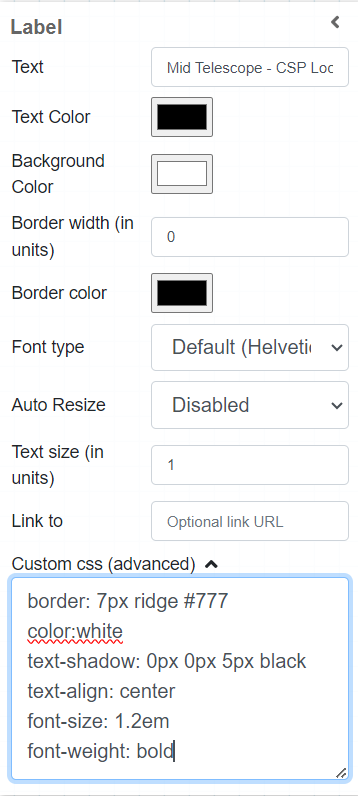
The settings of an label widget when automaticResize is enabled and advanced css features are applied.
Widget design
The below picture shows a number of labels with different settings applied to them.

Various Taranta labels, with the (invisible) cursor hovering over the Link label