Filter Widget
The widget enables the user to use a dashboard filters and change its value at run mode.
Widget setting
The user has the ability to select:
Title: A free label for the widget (string), shown before filter (leave blank to hide)
Filter: A dropdown containing all the filters of current dashboard (defined in dashboard configuration).
Filter Values(optional): It is used to add predefined values to the filter dropdown (to be shown in run mode).
To use this widget, the user need to first define filter on the dashboard. Then select a dashboard filter from the Filter Widget. During run mode, Filter widget simply changes the value of the filter.
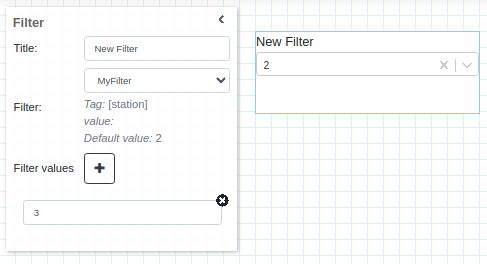
*Note: After selecting the filter from the dropdown, the system will pull and show the tag, value & default value of the filter.
default value is set while defining the filter. value is set from the filter widget during run mode.
default value would be used if value is empty or not set.
Now Attribute Display widget is subscribed to MyFilter (tag: [station], value: 2) and its device is test/tarantatestdevice/[station]. More specifically its device is test/tarantatestdevice/2
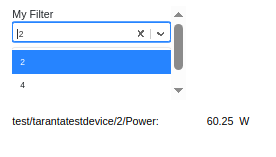
During run mode, the Filter widget shows a dropdown with Filter Values and default value in its option.
This dropdown can be used to change the value of the filter in run mode.
This change will trigger a change to all the widgets subscribed to this filter.
For eg. in below dashboard, Attribute Display is subscribed to filter MyFilter.
When MyFilter value is changed to 3 by Filter widget, the device field of Attribute Display widget changes to test/tarantatestdevice/3.
And its start pulling Power attribute value from it.
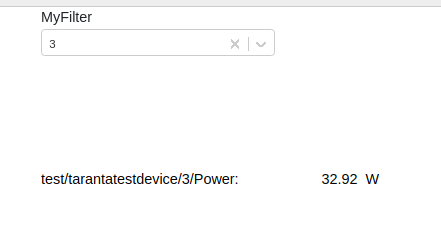
Notice: Once user changes the value of a filter, it will result in a change of value for all the widgets subscribed to that filter.
Dashboard filters explain more about functioning of filters
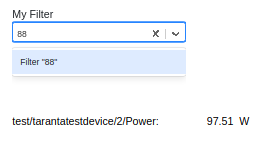
During run mode, if required value is not present in filter widget dropdown then we can type and select that value from the dropdown. See below image: